
Algorithmic Trading & Backtesting with StratGen
The Windows desktop platform for quantitative research and systematic strategy development. Run high-speed backtests on the v2 Tensor Engine, validate with multi-window walk-forward and Monte Carlo tests, export ready-to-compile code for NinjaTrader, TradeStation, and Python, and get up to speed with live training on best practices included.
- Core Engine
- v2 Tensor & Walk-Forward
- Signal Library
- 600+ Built-In & C# Custom
- Code Export
- NinjaTrader · TradeStation · Python
- Platform & Onboarding
- Windows 10/11 + Live Training
Built for Rigorous Quantitative Validation
StratGen replaces fragile curve-fitting and manual coding with a structured engineering workflow: discover candidate edges across 600+ signals, stress-test them on unseen Out-of-Sample data, and export production strategy code.
Strategy Discovery & AI Studio
Search across hundreds of parameterized indicators or build and compile strategies conversationally in plain English.
AI Copilot Conversational Studio
Design, backtest, and walk-forward validate quantitative strategies in plain English with autonomous Roslyn C# verification and instant code export.
StratGen Local Azores 1.0 & Cloud BYOK
Execute zero-token local quantitative synthesis directly on your Windows machine, or connect OpenRouter, Claude, OpenAI, and Gemini via local API keys.
Advanced Signal Analysis
Test over 600 technical and fundamental signals—including Moving Averages, RSI, MACD, Donchian, Elliott Wave, Z-Score, and Open Interest—to isolate repeatable market edges.
Import Your Own Market Data
Import custom OHLCV, tick, or Open Interest CSV datasets to test futures, equities, forex, crypto, or proprietary series with automatic history caching.
v2 Tensor Validation & Risk Engineering
Stress-test candidate systems against out-of-sample data, parameter sensitivity, and realistic execution frictions before risking capital.
v2 Tensor Backtest & Walk-Forward Engine
Run high-speed backtests and multi-window walk-forward optimizations in seconds with realistic slippage, commissions, and session-close handling.
Comprehensive Backtesting & Optimization
Evaluate strategies across strict In-Sample discovery and Out-of-Sample verification splits to filter out curve-fit parameter sets.
Robustness Testing Suite
Validate drawdown distributions and tail risk using single-strategy and portfolio-level Monte Carlo simulations, rolling walk-forward matrices, and stress testing.
Position Sizing & Portfolio Tracking
Model fixed dollar risk, percentage equity, fixed notional sizing, and pyramiding scale-ins, then combine systems to inspect portfolio correlation and incubation performance.
Execution Code Export & Live Onboarding
Move validated strategies directly into your brokerage execution platform with zero manual translation.
Automatic Code Generation
Export selected strategies or walk-forward parameter schedules as ready-to-compile code for NinjaTrader (NinjaScript C#), TradeStation (EasyLanguage), and Python.
External Agent & IDE Integration
Connect Claude Desktop, Cursor, Windsurf, or custom Python scripts directly to StratGen's engine via the built-in Model Context Protocol (MCP) server and Local HTTP Bridge.
Live Training on Best Practices
Every StratGen license includes live training on quantitative workflow best practices so you can master data setup, out-of-sample validation, and deployment faster.
Inside the StratGen Desktop Workbench
Inspect the actual Windows interface used to configure signal rules, evaluate out-of-sample equity curves, run walk-forward matrices, and generate platform code.
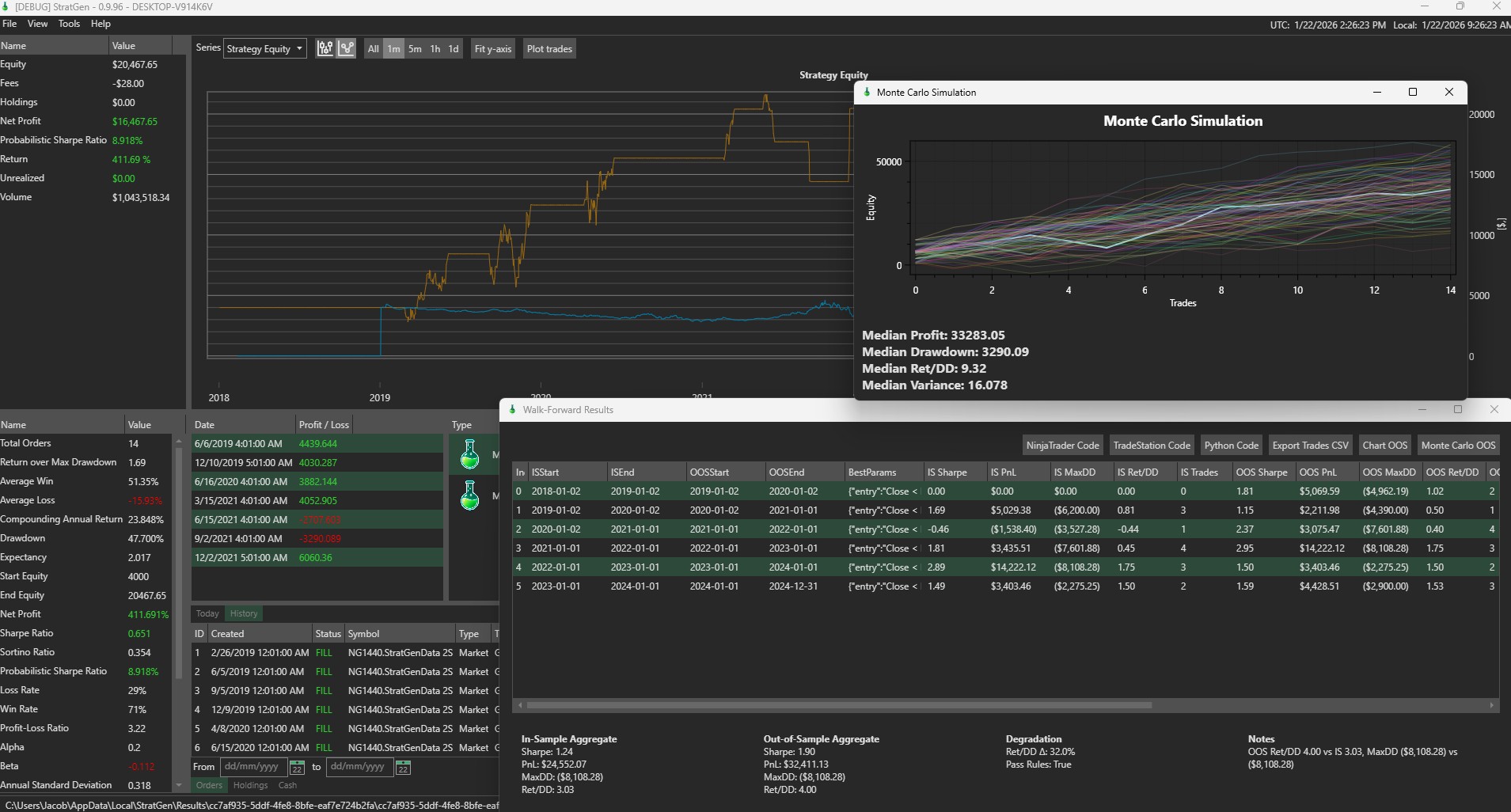
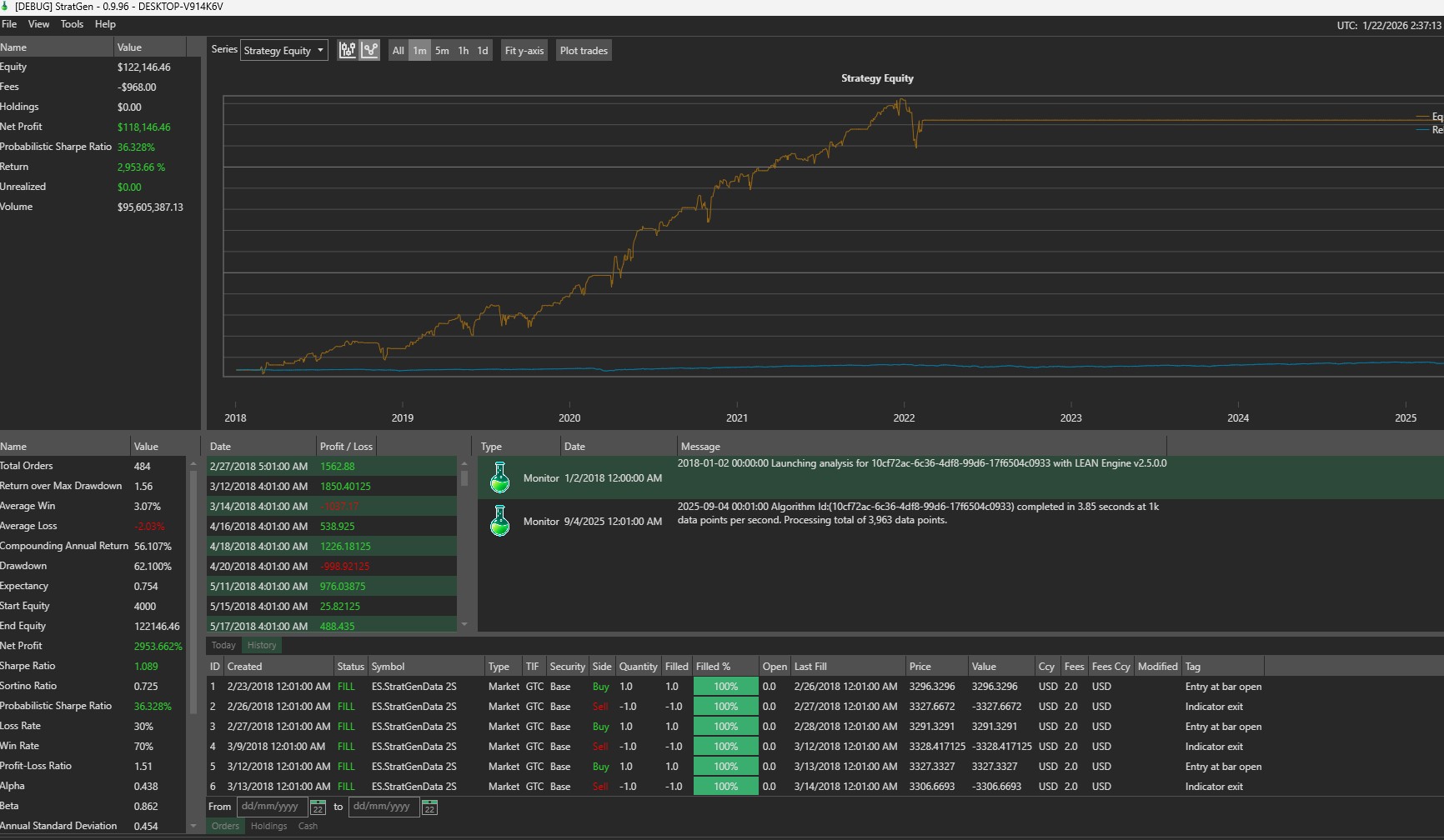
Backtest & Portfolio Dashboard
Equity Curves · Drawdown · Trade LedgerInspect In-Sample vs. Out-of-Sample equity progression, Return-to-Drawdown ratios, Sharpe metrics, and trade-by-trade execution logs across markets.
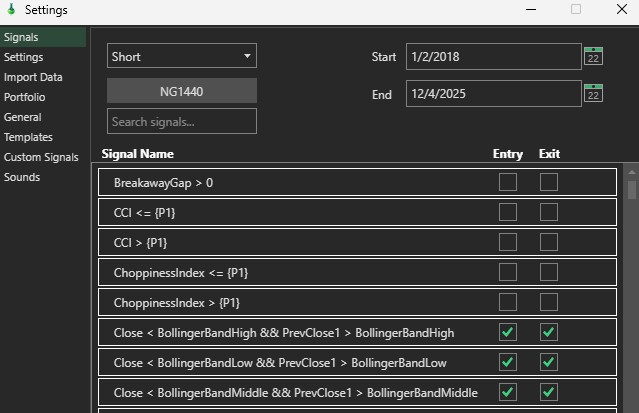
Signal Tester & Parameter Sweep
600+ Built-In Signals · Min;Max;Step GridConfigure Required, Entry, and Exit signal rules with tunable P1/P2 parameter ranges across multi-symbol watchlists.
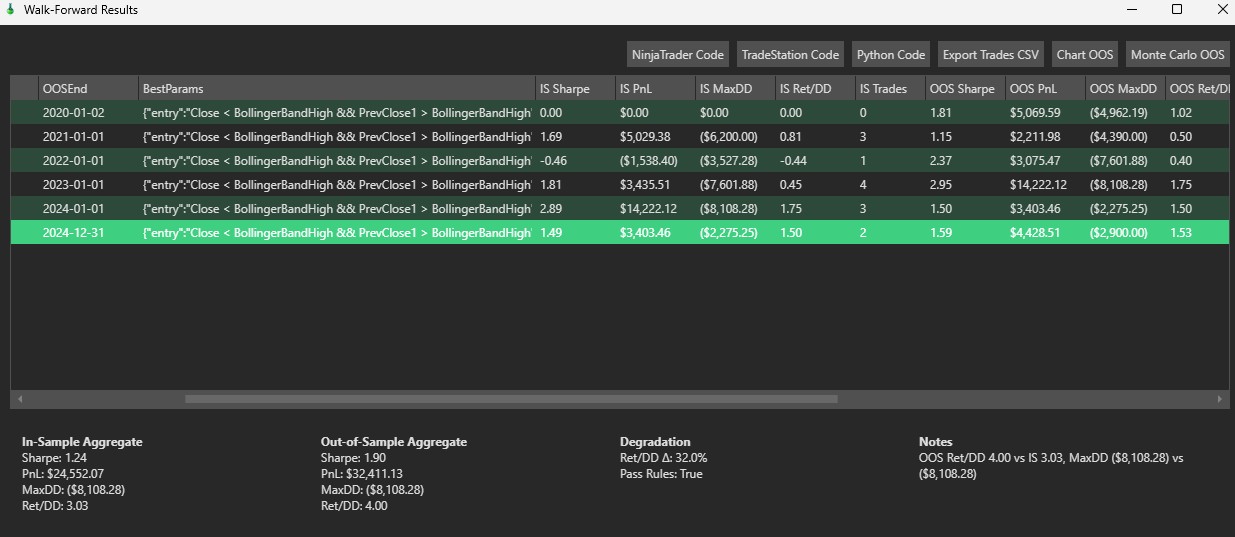
Walk-Forward & Robustness Matrix
Rolling Windows · Monte Carlo · OOS VerificationVerify parameter stability across rolling historical windows and run Monte Carlo simulations to measure worst-case drawdown probabilities.
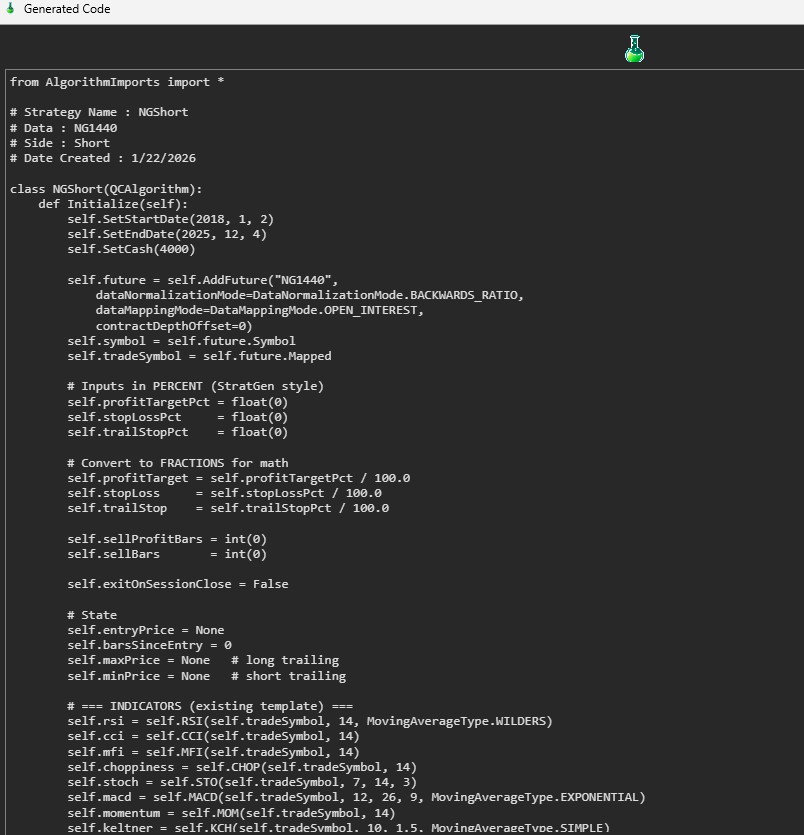
Multi-Platform Code Generator
NinjaTrader C# · TradeStation · PythonGenerate clean, ready-to-compile strategy scripts for NinjaTrader, TradeStation EasyLanguage, and Python directly from any validated backtest row.
Straightforward Licensing with Live Training Included
Every StratGen license unlocks the full desktop software—including the v2 Tensor Engine, AI Copilot, all 600+ signals, unlimited code exports, and live training on best practices.
Monthly License
Flexible month-to-month access. Cancel anytime with no future billing.
Lifetime License
Save $188 vs. Year 1One-time purchase for permanent desktop access and all future v1.x updates.
Included in Both Plans
- 600+ technical and fundamental signals
- v2 Tensor Backtest & Walk-Forward Engine
- AI Copilot Studio (Local Azores 1.0 & Cloud BYOK)
- Import custom OHLCV, tick, and Open Interest CSV data
- Support for futures, equities, crypto, and forex
- Single-strategy & portfolio Monte Carlo robustness suite
- Code export for NinjaTrader, TradeStation, and Python
- Built-in MCP Server & Local HTTP Bridge for external agents
- Live training on best practices included
- Priority email support & continuous v1.x updates
Subscription & Licensing Policy
All sales are final; we do not offer refunds. Monthly subscriptions can be canceled at any time and will not be billed thereafter. Lifetime access is a one-time purchase. By subscribing or purchasing, you agree to WeTradeLabs Inc.'s Terms & Conditions and Privacy Policy.
Frequently Asked Questions
Technical answers regarding supported markets, signal libraries, validation workflows, and code export.
- What is StratGen and how does it help with algorithmic trading?
- StratGen is a professional no-code algorithmic trading platform designed for quantitative traders. It provides backtesting, walk-forward and Monte Carlo robustness testing, automatic code generation for NinjaTrader, TradeStation, and Python, and live training on best practices included. It lets you research and validate rule-based trading strategies without writing boilerplate platform code.
- Can I use StratGen for futures trading, equities trading, and crypto trading?
- Yes. StratGen supports all major asset classes including futures, equities, crypto, and forex. You can import custom OHLCV or tick CSV data from any source to test strategies across different markets and instruments.
- How many technical indicators and signals does StratGen offer?
- StratGen includes over 600 technical and fundamental signals—such as Moving Averages, RSI, MACD, Bollinger Bands, Donchian Channels, Elliott Wave, Z-Score, and Open Interest—plus a C# MiniSignal editor for compiling custom indicators.
- What platforms can I export my trading strategies to?
- StratGen automatically generates ready-to-use strategy code for NinjaTrader (NinjaScript C#), TradeStation (EasyLanguage), and Python, including both static parameter exports and walk-forward-aware parameter schedules.
- What robustness testing tools are available?
- StratGen includes Out-of-Sample (OOS) data splitting, multi-window Walk-Forward Optimization, single-strategy and portfolio Monte Carlo simulations, and cross-strategy correlation matrices to verify how systems perform across changing market regimes.
- Is StratGen suitable for quantitative traders and systematic researchers?
- Yes. StratGen is built specifically for quantitative traders who require strict In-Sample / Out-of-Sample separation, realistic slippage and commission modeling, position sizing rules, and fast iteration via the v2 Tensor Engine.
- What operating systems does StratGen support?
- StratGen is a native desktop application for Windows 10 and Windows 11, executing backtests and local AI Copilot workflows directly on your hardware for maximum speed and data privacy.
- How does the backtesting engine work?
- The v2 Tensor Engine evaluates your entry, exit, and required signal rules against historical bar or tick data with configurable slippage, commissions, profit targets, stop losses, trailing stops, session close flattens, and pyramiding rules.
Trading Risk Disclosure
Mandatory financial and software disclaimers for quantitative research and automated trading.
Risk of Loss: Trading in financial markets involves substantial risk of loss and is not suitable for all investors. The value of investments can go down as well as up, and investors may lose all of their investment.
No Guarantees: StratGen is a tool designed to assist with trading decisions, but it does not guarantee profits or prevent losses. Past performance of any trading system or methodology is not necessarily indicative of future results.
Software Limitations: While StratGen is designed to be reliable and accurate, technical issues, data errors, or other factors may affect its performance. Users should not rely solely on the software for trading decisions.
Hypothetical Performance: Any backtesting results, simulations, or hypothetical performance shown are for illustrative purposes only. They do not represent actual trading and may not account for all market factors or risks.
Professional Advice: The information provided by StratGen is not intended to be a substitute for professional financial advice. We recommend consulting with a qualified financial advisor before making investment decisions.
User Responsibility: Users are solely responsible for their trading decisions and should conduct their own research and due diligence before placing trades based on signals generated by StratGen.
By using StratGen, you acknowledge that you have read and understood this risk disclaimer, our Terms & Conditions, and our Privacy Policy, and agree to assume full responsibility for your trading decisions.